

Stellar Appliance CLI User Guide
Overview
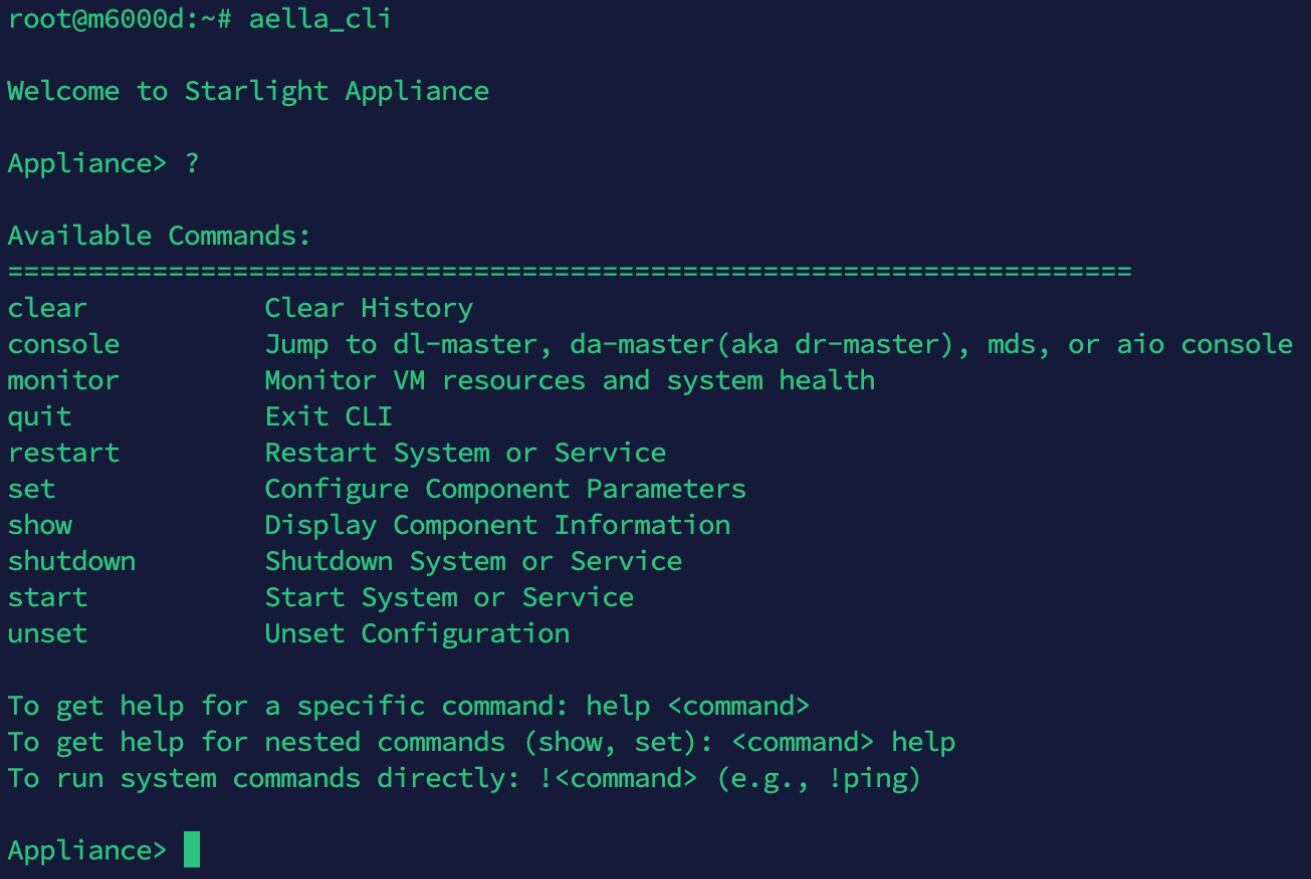
This document is the comprehensive user guide for Stellar Appliance CLI. Stellar Appliance CLI is a command-line management tool designed for Stellar Cyber OpenXDR environments. It provides a unified operational interface for KVM hosts where OpenXDR components (Data Processor, Sensor, or AIO) have already been deployed using the official installer scripts. The CLI focuses exclusively on post-deployment operations, helping system engineers and operators configure, control, and maintain the environment in a safe, consistent, and auditable manner. It focuses on:- network configuration (ifupdown-based)
- time synchronization (NTPsec)
- firewall access control (iptables-based ACL)
- virtual-machine operations and monitoring
- controlled operational changes without redeployment
1. Architectural Role of Appliance CLI
Stellar Appliance CLI runs on the KVM host. It operates above the operating system and libvirt layers but below the OpenXDR application layer as an operational control layer. The CLI manages:- host network configuration (ifupdown-based)
- time synchronization (NTP)
- firewall access control (iptables)
- virtual-machine operations (console, autostart, monitoring)
- host system metadata and services
Designed for
- post-deployment configuration changes
- network / NTP / firewall administration during operations
- safe VM access and monitoring
- repeatable and auditable operational workflows
Not designed for
- initial OpenXDR deployment
- disk-layout or storage reconfiguration
- VM topology redesign
- replacing installer-script logic
2. CLI Navigation and Command Model
Start the CLI
Command structure
Commands follow a consistent model:Primary commands
Help and shell commands
Help for a command:show and set:
Usability features
- tab completion for commands, VM names, and interfaces
- interactive help
- consistent syntax across commands
3. Network Configuration Management
The CLI manages runtime network configuration using an ifupdown-compatible model aligned with the OpenXDR installer scripts.Display network information
Configure network interfaces
DNS configuration is currently supported only on the
mgt interface. unset interface does not provide a DNS-removal option; supported remove/action values are ip, gateway, and restart.Apply changes (required)
Network changes are not applied until the interface is restarted.Operational notes
Configuration files:- Netplan should be disabled
- the installer scripts handle this transition
- always restart the interface after a network change
4. Time Synchronization (NTP)
The currently supported backend is NTPsec. The CLI modifies the CLI-managed section of/etc/ntpsec/ntp.conf and uses the NTPsec service.
Commands
Behavior
- verifies that NTPsec and its configuration file are usable
- adds or replaces Server/Pool entries in the CLI-managed section
- applies the NTPsec configuration and checks runtime peer status
unset ntpremoves only NTP peers managed by the CLI
5. Firewall Access Control (ACL)
5.1 ACL Overview and Design Model
Stellar Appliance CLI manages firewall rules using a policy-based ACL abstraction built on the iptables INPUT chain. The ACL layer intentionally hides low-level iptables complexity and provides a safer, more predictable operational model. Key characteristics:- ACL rules apply only to inbound traffic
- rules are evaluated from top to bottom
- rules are added in append order
- manual rule insertion or reordering is not supported
- local interface IPs are always allowed
- rule action is determined entirely by the selected ACL policy
- ACL rules control access from a source IP or network to this KVM host
5.2 Initialize ACL Policy (set acl policy)
Before defining ACL rules, initialize the policy:
- ACL mode:
whitelistorblacklist - the target interface where the ACL will apply
5.3 ACL Modes: Whitelist vs Blacklist
Whitelist mode (recommended)
Concept:- only explicitly specified sources are allowed
- all other traffic is automatically denied
- every user-defined rule becomes an ALLOW rule
- a deny-all rule is automatically placed at the end
- the operator does not manually create deny-all
Blacklist mode
Concept:- traffic is allowed by default
- only explicitly specified sources are denied
- every user-defined rule becomes a DENY rule
- default allow-all behavior is maintained automatically
- the operator does not manually create allow-all
5.4 Policy Behavior Summary
The operator only needs to decide:
- which policy mode to use
- which interface to protect
- which IP, network, or port to specify
5.5 Select the Target Interface
After selecting the ACL mode, choose the interface to protect.5.6 Define ACL Rules (set acl)
Use:
- there is no
allowordenykeyword - rule action is derived automatically from the selected policy
- multiple ports, ICMP (ping), and
allare supported
5.7 Rule Examples
Example 1: Allow a management network in Whitelist mode
- allow all traffic from
10.10.10.0/24
Example 2: Allow SSH and ping from an administrator workstation
- allow SSH (22) and ICMP traffic from
192.168.1.50
Apply rules
- staged rules are applied to iptables
- Whitelist mode automatically enforces deny-all
- Blacklist mode automatically maintains allow-all
- after a successful apply, the CLI first attempts
netfilter-persistent save; if that is unavailable, it falls back toiptables-saveto persist the runtime ACL across reboot - if persistence tools are unavailable or saving fails, the CLI emits a warning; operators must verify the result
5.8 Remove ACL Rules (unset acl)
Rules can be removed at any time:
5.9 Apply with Reset
set acl apply- applies currently staged rules
set acl apply --reset- removes existing AELLA-managed ACL rules
- rebuilds from the staged rules
- useful for larger policy changes
5.10 Built-In Safety Protections
The following addresses are always allowed and cannot be blocked:- not displayed in
show acl - cannot be removed with
unset acl - intended to reduce the risk of locking out administrators
6. System Information and Configuration
Display information
Change system settings
7. Virtual-Machine Operations
VM console
VM autostart
Monitoring
8. Patch Management
The CLI can apply Data Platform patches and review patch history.set patch apply <patch_name>— retrieve and apply the specified Stellar patchshow patch_history— show the patch-history summaryshow patch_history <patch_name>— show detailed results for the selected patch
9. Logging and Auditability
CLI operations are logged automatically.Log location
Logged information
- timestamp
- executed command
- execution context
10. Operational Best Practices
Recommended uses
- post-deployment operational changes
- network / NTP / firewall management
- safe VM access and monitoring
Not recommended
- initial deployment
- storage-layout changes
- VM topology redesign
- replacing the installer
11. Compatibility and Scope
The CLI is compatible with these OpenXDR installer scripts:- recognizes network configuration managed by the installer scripts
- manages NTPsec configuration created by the installer scripts
- supports NAT and Bridge modes
- manages VMs deployed by the installer scripts